One Must Imagine Sisyphus Happy
A 20 minute adventure to fix a camera driver turns into an entire infrastructure project
Editor's Note
Some of the solutions to problems in this article could have been solved (faster) by me asking ChatsGippity. My modus operandi in personal projects avoids AI usage unless I'm absolutely stumped. As of writing, this has only happened once and in that case it was not helpful in solving the problem. I do plan on posting about my thoughts on AI usage after this novella post is published to feed the flames of discourse on AI. So don't ask "wHy NoT aSk ClAuDe?" if you see something stupid. Embrace the stupidity.
I will embellish some points for narrative effect, but the core messages I want to convey remain intact. Enjoy this story almost a year in the making!
About a year ago, I noticed that the webcam on my 3D printer server suddenly stopped working. I remembered doing a ad-hoc package upgrade and thought maybe one of the libraries is broken. Naively, I checked the apt log (I was using Raspbian originally) and started to rollback packages I thought were the culprit. ustreamer? No change. libcamera? Crashes somehow, had to rollback further. Maybe it's haproxy (starting to grasp at straws)? No beans. Soon, I start rolling back Raspberry Pi kernel versions. No Luck. I check dmesg and my config.txt. Nothing out of the ordinary. Maybe I forgot to build a kernel module for the camera? It's included with the Raspberry Pi kernel, I see it get loaded. What if it's a udev rule I'm missing? Doesn't seem like it (after a brief skim of udev docs). I started to consider it might be a hardware issue, so I buy a new camera module and DSI cable. IT DOESN'T CHANGE ANYTHING. I even use a different Raspberry Pi 4 I had on my shelf. IT STILL DOESN'T CHANGE.
At this point, I'm pissed. I spent two weeks at this point trying to rollback packages only to not fix the problem and potentially break something else without my knowledge. I started to forget which things I rolled back and at some points it started to become a mess trying to figure out what changed with each rollback. Configuration changes to firmware were also very easy to forget, probably wasting more of my time even more with false leads. Then I started noticing how much random bullshit was just in this Linux install and wondered how did it happen? Like any needle in a haystack, finding it becomes harder the more hay that has to be dug through.
I decided to nuke the installation. But I wanted to avoid this problem of having to debug a break like this again. Just one command, maybe a reboot, and I could instantly restore my entire system before I did an upgrade. That would be nice.
The Journey Begins
A few months, I was browsing my timeline on Twitter when I saw mentions of NixOS in a debate about good operating systems. I've lost the thread to time, but I looked into it and the concept interested me: Deployment/Infrastructure as Code but at a whole system level. I started reading documentation about the Nix language and package manager, and started toying around in a WSL environment to familiarize myself with the various driving concepts behind it. It took a few weeks but I soon had a WSL environment in pure NixOS where I could mess around with building system images. Then I started digging into how creating installer images work. Understanding the magic (and bullshit) really started to take place at this point.
At a high-level, the building block of Nix/NixOS is the derivation, which defines how a package is built and installed, as well as how to run the exectuables with dynamic linkage*. Each derivation is constructed through the evaluation of Nix expressions, which is written using the Nix programming language. Evaluting a Nix expression will build the package from source** and save the resulting derivation into the Nix Store along with metadata about the hermetic* build environment the derivation contents were compiled under. The contents of the Nix Store is read-only even to root users*. Installation of derivations do not copy files to directories like /bin or /share, rather symlinks are instead created to the derivation contents in the Nix Store. From an ecosystem view, Nixpkgs is the package repository and source for building NixOS as a system derivation, which is imported into a Nix expression to provide the ability to declare available (not install) packages and configure installed services.
This paradigm is a bit tricky to get the hang of initially (I would know I spent a month trying to nail it down), so this example might help.
Editor's Note
You might have noticed some asterisks on items in the previous section. Some clarifying notes before we move on:
- This is done through a lot of
patchelfcalls on executables built in derivations since the dynamic libraries and linker used are in the Nix store and not in standard FHS locations. - Technically, the derivation could simply download a compiled binary tarball and the compilation step is copying the compiled blobs into the install path, but that defeats the key point of derivations.
- Writing to the Nix store is done through the Nix Daemon
Suppose for some reason I don't have sed installed on my NixOS machine. In order to install it, I need to have a Nix expression defining how to make the derivation for sed. In Nixpkgs, the NixOS package repository and utility library, this is what the Nix expression defining the derivation for sed looks like (with some extra stuff to make it potentially a bit more clear):
# Reference: https://github.com/NixOS/nixpkgs/blob/f20fda6d42187f1c54896b1356941472cc844972/pkgs/tools/text/gnused/default.nix
{
  lib,
  stdenv,
  fetchurl,
  updateAutotoolsGnuConfigScriptsHook,
  perl,
}:

stdenv.mkDerivation rec {
  pname = "gnused";
  version = "4.10";

  # This could be changed to a different thing, provide some function returning
  # a set of files to copy into the hermetic environment as sources before building.
  # This one fetches the sed sources from the GNU mirrors.
  src = fetchurl {
    url = "mirror://gnu/sed/sed-${version}.tar.xz";
    sha256 = "sha256-uOchgrLslqNXTimYxHt6qmTMIM4ADY6awxPMB87PKMc=";
  };

  # What things this package provides.
  outputs = [
    "out"
    "info"
  ];

  nativeBuildInputs = [
    updateAutotoolsGnuConfigScriptsHook # This injects a step before configure to make the script "newer"
    perl        # we need perl available
  ];

  preConfigure = "patchShebangs ./build-aux/help2man";
  # Prevents attempts of running 'help2man' on cross-built binaries.
  env = lib.optionalAttrs (stdenv.hostPlatform != stdenv.buildPlatform) {
    PERL = "missing";
  };

  # This is implicitly specified with derivations built in the
  # Standard Environment (stdenv), but I add it here to better
  # demonstrate how a derivation (at least those in/using Nixpkgs) works.
  #
  # There will be a bunch of `runHook` calls, which are a provided
  # shell function in the effective script that is generated by Nix
  # to build the derivation. These just make sure pre/post phase steps
  # that are defined in derivations are executed.
  configurePhase = ''
   runHook preConfigure
    ./bootstrap
    ./configure
    runHook postConfigure
  '';

  buildPhase = ''
    runHook preBuild
    make
    runHook postBuild
  '';

  checkPhase = ''
    runHook preConfigure
    make check
    runHook preConfigure
  '';

  installPhase = ''
    runHook preConfigure
    make install
    runHook preConfigure
  '';

  # This is metadata in Nixpkgs similar to pkginfo.
  # Most derivations I write outside of nixpkgs don't use this
  meta = {
    homepage = "https://www.gnu.org/software/sed/";
    description = "GNU sed, a batch stream editor";

    longDescription = ''
      Sed (stream editor) isn't really a true text editor or text
      processor.  Instead, it is used to filter text, i.e., it takes
      text input and performs some operation (or set of operations) on
      it and outputs the modified text.  Sed is typically used for
      extracting part of a file using pattern matching or substituting
      multiple occurrences of a string within a file.
    '';

    license = lib.licenses.gpl3Plus;

    platforms = lib.platforms.unix;
    maintainers = with lib.maintainers; [ mic92 ];
    mainProgram = "sed";
  };
}
Now evaluating this Nix expression will pull the sources for sed, compile it with make and run the provided tests, then install it in the Nix store. This can be seen with the following:
$ nix eval nixpkgs#gnused
«derivation /nix/store/8a41q43mxgkvi3a1pihlp9xiakgqvggx-gnused-4.10.drv»
This store path is then able to be provided in other Nix expressions (both system derivations or other package derivations) or in temporary environments. For example, if I want a temporary environment which has sed available to use in the shell PATH, nix-shell can be used like such:
# Just because sed is available in the local Nix store
# it isn't in this shell environment's path
$ sed --version
zsh: command not found: sed

$ env | grep PATH
PATH=/bin;/usr/bin;<truncated...>

# Let's add it
$ nix-shell -P gnused

# This is now run in a new shell with updated PATH env
# Commands run in this shell will be indicated with %
% sed --version
sed (GNU sed) 4.10
Copyright (C) 2026 Free Software Foundation, Inc.
License GPLv3+: GNU GPL version 3 or later <https://gnu.org/licenses/gpl.html>.
This is free software: you are free to change and redistribute it.
There is NO WARRANTY, to the extent permitted by law.

Written by Jay Fenlason, Tom Lord, Ken Pizzini,
Paolo Bonzini, Jim Meyering, and Assaf Gordon.

This sed program was built without SELinux support.

GNU sed home page: <https://www.gnu.org/software/sed/>.
General help using GNU software: <https://www.gnu.org/gethelp/>.
E-mail bug reports to: <bug-sed@gnu.org>.

# Check the updated path
$ env | grep PATH
PATH=/bin;/usr/bin;<truncated...>;/nix/store/8a41q43mxgkvi3a1pihlp9xiakgqvggx-gnused-4.10/bin
And that's the fundamentals of Nix (with a lot of abridging). There is a lot I intentionally excluded in this description to focus more on my descent into homelabbing madness, but Nix solves some interesting problems related to software distribution and packaging that other existing solutions have had trouble with. The big one is Dependency/DLL Hell which was the most likely culprit behind my camera driver issues; Nix derivations being uniquely keyed in evaluation means that I can easily have true control over which depdencies and what version is used when building drivers or systems. Once I got the derivation for the camera streaming software working after a good chunk of debugging Video4Linux configuration and Device Tree Overlays (since default NixOS does not come with the Raspberry Pi OS defaults), it was extremely cathartic to see it simply work after all that. But by that time, Black Friday just passed and I had a new toy shipped in the mail.
The "Gateway" Drug to Home Labs: A NAS
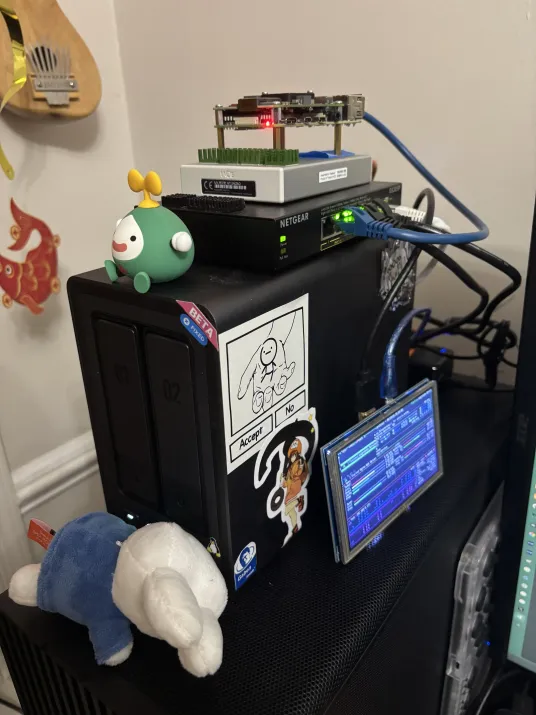
I don't know what exactly compelled me to buy a NAS. Maybe it was the bajillion consumer hard drives I shucked out of portable HDDs/SSDs and questionable runtime stress I put them under. Maybe it was because I was learning so much sysadmin stuff at my job that I wanted a playground that wouldn't affect a million people. Either way, I got a $200 dollar discount on a 2-Bay UGREEN NAS and acquired two 14TB WD Red HDDs that black friday. As of writing, I made a good decision and am really happy with the purchase, but of course getting to this point was fairly rocky because I just had to be quirky and use NixOS instead of my default UGREEN NAS software. Surely it can't be that bad.
The first problem is to figure out how to get to a boot menu to even install Linux. After mashing Ctrl + F12 or some combination I get into the BIOS and select the USB drive. I boot into the NixOS live image. I start getting some disk UUIDs so I can write my partition layout with disko. But suddenly, after about 3 minutes the NAS reboots. Just out of nowhere. Maybe the flash drive I had the installer on was bad. So I burned the live image again on a new flash drive. It reboots after 3 minutes again. I boot in but do nothing. Reboots in 3 minutes. I start questioning if UGREEN put some bizarre write-protection on their OS. I check the BIOS. It turns out there is a setting which acts as a Watchdog Timer and will restart the machine if it does not get a specific "message" from the running OS. I turn it off. I boot into the live image. I wait 3 minutes. Then I wait another 2 minutes. Then I wait another 5 minutes because I'm paraniod. After 3 days of on-off debugging. I have only figured out how to run the NixOS live image on the NAS, I haven't even installed a base system.
This somehow didn't deter me from continuing.
Before I can install NixOS, I need to identify a partition scheme given this is a server-like Linux install focused on bulk storage. With this NAS, I have a 32GB internal eMMC (which currently holds bootloaders and the UGREEN OS), two HDD Bays which are each fileld with 14TB disks, and two M.2 NVMe slots on the inside of the left HDD bay which I inserted two 512GB sticks I scraped from old laptops. Just considering data resiliency itself is a fun little adventure into learning about RAID and filesystems supporting multi-disk arrays. Questions like "how fast do I need to write data", "how much data am I willing to lose", "what is the minimum storage I want available as actual storage" start to become relevant. I'm going to cut out a bunch of research and give highlights on my decisions for my partition setup:
- All data/system partitions use Btrfs. More advanced than
ext4and supports configurable compression and defragmentation: useful for maximizing density of data storage. - The eMMC uses a fairly simple partition layout (separapte
/bootand/) seen in most simple Linux installs. - I use
mdadmfor two separate RAID 0 (Mirror) groups- The two 14TB HDDs are the "archival" RAID pool and intended to be read + slow write with the nature of that data.
- The two 512GB NVMe sticks are the "fast" RAID pool used for system swap, things that need fast writes (i.e. live databases, caches), and more frequently updated data.
Editor's Note
Some quick things about the partition setup that I think are important to shout out:
- Btrfs does support being the manager of the RAID pool, I couldn't figure out how to easily do it with disko. Plus
mdadmis easier to hook up alerts to from my experience. - I could get away with the "fast" drives not being in a RAID 0 pool if there are backup jobs that regularly copy stuff to the archival RAID pool. But what's the fun in having only one RAID pool.
After writing the partition configuraiton and executing the steps with disko, I now have empty partitions to install Nix into. Using disko provides the additional benefit that it becomes part of the system derivation and auto generates systemd mounts on system rebuilds. But the first install process a bit of "provisioning work" to deal with secrets. Why? To prevent writing unencrypted secrets in the Nix store. For this, I use sops-nix, which allows associating a secrets YAML with a set of SSH Host keys to decrypt against. But those host keys only exists after the system is installed and run for the first time. So I have to have a provisional configuration which has the minimum information without encrypted secrets, get the public key, then add the encrypted secrets configuraiton and rebuild the system deivation. A small annoyance, but afterward secrets can be declared securely for that machine easily, even across machines if configured as such. I'm not going to dive deeper into secrets management because that is a whole additional design discussion that I want to avoid in this already long post.
So I have an empty NAS with NixOS installed and configured to be remoted into for management and remote system derivation updates. The next step is to make a Network File Share. For this I chose SMB via Samba over NFS because of the need for Windows systems to be able to access it without too much extra hassle*. So I start looking into how to configure Samba. I follow this convenient NixOS wiki page for Samba, declare the bind mounts for the Samba shares I wanted, then wrote the Samba configuration. Then I rebuild the NAS system config and try to connect from my Windows machine. It fails immediately. And the worst part is that it's a simple "Something went wrong". I start fiddling with the Samba configuration. Maybe I messed up some security settings. I get a different error this time. I revert my changes. Still "something went wrong". I try to scrounge Event Viewer for more information. Nothing. I even try connecting with my iPhone because the Files app supports Samba. That fails with no indication either. Great. It's Christmas day and I am trying to figure out why my Samba configuration is broken. Then... I found it:
Figured out the issue.
— shabingus (@_FaceFTW) December 25, 2025
Had to increase samba log level to find out that I put bad "force group" parameter. This took 24 hours to figure out and I'm so happy but also mad.
Anyways... https://t.co/5TsH3gqWFt pic.twitter.com/aJcJD5FJig
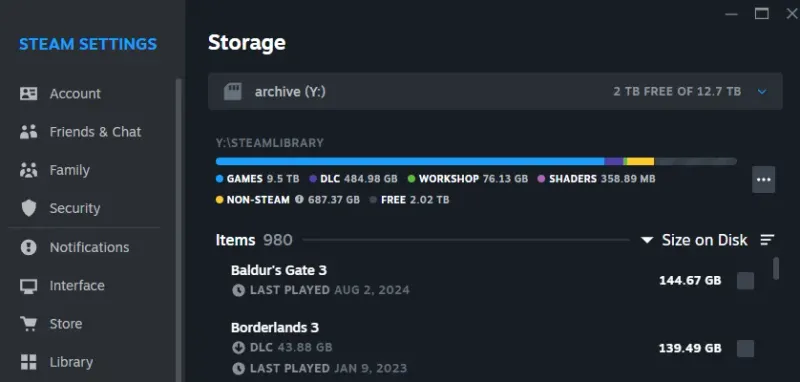
That is cursed. And also really annoying. But it works. And that's what matters. Samba having to translate how users are defined from Microsoft AD-like user system to some Linux user definition is black magic that I am relieved I do not need to get into. I start migrating over my files, I setup the network volumes, and start downloading my entire Steam library. As of today, it currently sits at 9.5TB of my storage with level 9 zstd compression at the Btrfs layer. All of this backed up in a RAID 0 mirror that is acessible by any device on my network.
Editor's Note
Technically, Windows does support NFS v2/v3 as of recently but my intial NFS attempts didn't work and I didn't have as many Linux devices to determine if it was a Windows issue.
But wait, I forgot to mention something that happened before I could even setup Samba. Yet another fun hiccup.
Once you've been shopping for PC parts, you'll want to beat Sam Altman to death
The UGREEN NAS model I purchased only came with 8GB of RAM. While swap space could be used to act as extra RAM, it doesn't always scale that way especially when many processes with "hot" pages are running concurrently. I learned this by accident by trying to run NixOS rebuilds which built WebKit from source on a 1GB Raspberry Pi 4 before I learned about Nix remote builders.
hmmm I wonder why this nix rebuild is taking so long on my raspi?
— shabingus (@_FaceFTW) November 1, 2025
> building an entire browser engine, it has been 8 full hours on just that package
> maxed out swap space
> still running somehow pic.twitter.com/rT7b9DLFTK
Luckily, UGREEN provided the option of upgrading the RAM. But because it was DDR5, I still needed to buy a fresh stick. I checked the specs and bought a 16GB stick of Corsair Vengance DDR5 rated for 4800 MT/s at 1.1V. The same operating conditions as the pre-installed 8GB stick. I install it. It goes well for about 5 hours, then I get a freeze. I eventually realize it's a hard freeze (not even a kernel panic) and did a power cycle. I think nothing of it untill 3 hours later, another freeze. I connect one of my Raspberry Pi HDMI displays and tape it to the side of the display just to monitor the dmesg log when it freezes. This time it survived until sometime while I was sleeping and now I don't have another data point to use for troubleshooting. I power cycle yet again, it freezes in 30 minutes! Each time I just let the system run idle with the exception of htop on the main TTY just to get a visual indicator when it freezes. And the freeze is abrupt and silent. No dmesg, systemd journal, or magic smoke* is indicative of what could be the issue.
Editor's Note
"Magic smoke" refers to the mystical gas inside your electronic components that allow it to do things with electricity. Letting that smoke escape will destroy the functionality of the device.
I start to panic internally. Surely it isn't something wrong with my drives right? I spent $300 per NAS drive and returning/exchanging them would be a massive hassle. I try running without the hard drives. Still get the freeze. I take out the SSD and run with no attached drives. Frozen after 2.5 hours. I start to take apart the NAS from it's chassis just to inspect the motherboard; maybe some magic smoke got trapped in the chassis? After an hour of non-destructive teardown, all the boards look as clean as a PCB should. I spend 2 hours putting it back together in a non-destructive way without a manual and am stumped. Then I think "surely it isn't the RAM?" So I do an experiment and use the pre-installed RAM stick. I turn on the NAS.
A full day passes. Didn't freeze yet. I gained the courage to reinsert the SSDs and HDDs and power cycle the machine.
Another full day passes. I check logs and nothing out of the ordinary like before.
A second day passes. By this point I am convinced it was the RAM stick.
When I purchased the RAM from Amazon, I spent $200 dollars USD. As of writing, the same stick is now $400 USD. I now have a $200 DDR5 paper-weight sitting with my stack of DDR3s and DDR4s, and the worst part is that I think it is actually functional. Since the BIOS of the NAS (and most BIOSes for that matter) don't provide options to change the parameters of the RAM, it could just be a configuration issue of putting a circle into a square hole: it fits, but there is a lot of gaps. Compared to the previous generation, DDR5 has some architectural changes such as moving power management to each DIMM which may be impacting something subtle that I'm just not aware about. I don't have the patience (or budget) to look into this further. So 8GB it is.
Editor's Note
The actual length of time to produce the freezes in this section, while random, are purely made up for narrative effect.
So now, I can surely start adding some things to my NAS beyond file storage. Surely that isn't another significant debate?
You ever what life was like without Docker?
When working in tech, one will usually encounter Docker and/or container-based deployments. Extend that with Kubernetes, maybe some GitOps solution, and voila! Atomic, isolated, self-healing web application deployments that power most websites and apps. But remember: Docker and containers as a concept is fairly new in the history of computers, it was publicly released in 2013. The original container engine, Linux Containers (LXC) that Docker was built on, didn't even exist until 2008. Back when the Dot-Com bubble was bursting, companies were (probably) "raw-dogging" PHP servers on Linux servers with no isolation*. And that was the direction I was heading, or somewhat.
Editor's Note
I have no proof of these claims. But any proof supporting or denying my claims can be sent by email or Twitter dot com
Linux supports many mechanisms to isolate processes, users, files, and the like: kernel namespaces, cgroups, SELinux, capabilities, chroots, and more. In fact, these are the mechanisms which are used by LXC to provide the isolation of containers but use the same kernel. The thing is though, you don't need a container engine to replicate the same isolation effect when systemd units provide enough of that functionality already. Skimming through the systemd manpages, there is either a direct correlation or some similar setting that can replicate the desired behavior. In some aspects, it is more customizable than Docker given that systemd is the effective backbone of systems it is installed on. For example, this is the rendered definition of the service to run Immich's machine learning module for features like OCR and semantic matching:
[Unit]
After=network.target postgresql.target
Description=immich machine learning
Requires=postgresql.target

[Service]
Type=simple
Environment="IMMICH_HOST=localhost"
Environment="IMMICH_PORT=3003"
Environment="LOCALE_ARCHIVE=/nix/store/0da8w48lpq7zgyp7slalhlljjrqn7nsx-glibc-locales-2.42-84/lib/locale/locale-archive"
Environment="MACHINE_LEARNING_CACHE_FOLDER=/var/cache/immich"
Environment="MACHINE_LEARNING_WORKERS=1"
Environment="MACHINE_LEARNING_WORKER_TIMEOUT=120"
Environment="PATH=/nix/store/3qgy8q2j64v2m9jy3a5jmssacbblhd4r-coreutils-9.11/bin:/nix/store/i4kjidyvl8ciwbcwm75g75sriq3knav0-findutils-4.11.0/bin:/nix/store/yhr4ps9rdmb55pgqaq246vlh7xfac1dx-gnugrep-3.12/bin:/nix/store/4nylac9gazdpsid79qyk0jpqm312b2jx-gnused-4.10/bin:/nix/store/sm8d6jpilwdy3bw3yq2lv8rr8jld26pb-systemd-261.2/bin:/nix/store/3qgy8q2j64v2m9jy3a5jmssacbblhd4r-coreutils-9.11/sbin:/nix/store/i4kjidyvl8ciwbcwm75g75sriq3knav0-findutils-4.11.0/sbin:/nix/store/yhr4ps9rdmb55pgqaq246vlh7xfac1dx-gnugrep-3.12/sbin:/nix/store/4nylac9gazdpsid79qyk0jpqm312b2jx-gnused-4.10/sbin:/nix/store/sm8d6jpilwdy3bw3yq2lv8rr8jld26pb-systemd-261.2/sbin"
Environment="TZDIR=/nix/store/p0ff33dca0fbkskqwrl3spvxcn5974h0-tzdata-2026c/share/zoneinfo"
Environment="XDG_CACHE_HOME=/var/cache/immich"

CacheDirectory=immich
ExecStart=/nix/store/gp19vj6siqb8avzjcr7j2zvchi9ry764-immich-machine-learning-3.1.0/bin/machine-learning

Slice=system-immich.slice

User=immich
Group=immich
UMask=0077

NoNewPrivileges=true
CapabilityBoundingSet=
PrivateDevices=true
PrivateMounts=true
PrivateTmp=true
PrivateUsers=true
ProtectClock=true
ProtectControlGroups=true
ProtectHome=true
ProtectHostname=true
ProtectKernelLogs=true
ProtectKernelModules=true
ProtectKernelTunables=true
RestrictAddressFamilies=AF_INET
RestrictAddressFamilies=AF_INET6
RestrictAddressFamilies=AF_UNIX
RestrictNamespaces=true
RestrictRealtime=true
RestrictSUIDSGID=true

Restart=on-failure
RestartSec=3

[Install]
WantedBy=multi-user.target
There is a lot described here in this one file. From the top, the unit dependencies of the service is declared, meaning that the service will only start after the dependencies are successfully running; if for some reason Postgres fails to start, then this service will not start. Afterward, the actual service definition is started with a few environment variables for application-specific configuration and setting the PATH to necessary executables in the Nix Store. Then, the cool things you can't do easily in Docker begin. First is registering this service under a slice, ensuring the service process is run under the correct cgroup node for compute resource management; Docker does automatically for each container since this is one of the core mechanisms for isolation. Then the user and group are set for the process, adding further isolation through the standard Linux access control mechansisms. Dockerfiles allow specifying the user to run as, but by default it uses root and often tends to be ignored. Finally, additional restrictions are placed on the execution environment of the service. Explicit declarations to enforce limited privileges and sandboxing for filesystem access, kernel access, sockets, even ownership properties. The systemd-exec(5) manpage is extremely in depth on the tuning capabilities for the execution environment, compared to Docker which abstracts most of that away.
Do I recommend running things bare-metal for large services? Absolutely not. Containers are a really useful software deployment architecture that will work for most use cases. The main reason I didn't use containers to deploy internal services is because Nixpkgs already has many modules to generate systemd unit configurations for many services. The one advantage Nix and its use of systemd does have compared to Docker (and Kubernetes) is that it is much easier to have stable configurations and system state because all the service deployments are Nix expressions which point to Nix store derivations, it is easy to reproduce and rollback as needed through the NixOS management commands. If you use GitOps systems like Flux, the concept is similar with the core difference being the underlying mechanism of action to manage infrastructure.
So What Does my NAS Do?
With a mechanism for hosting isolated applications, I can run many services for different things I want to be able to do. The only constraint is that I will only be able to access the services while connected to my home network. With that in mind, these are the following services I chose:
- Immich - Photo Library
- Great Photo Library management app, includes a ML module to allow for extra metadata like object recognition and OCR like in Apple Photos.
- Has an official mobile app which supports automatic backup to corresponding albums on the server.
- Navidrome - Music Library
- Music streaming server built on the OpenSubsonic protocol. Supports scrobbling to Last.fm
- MusicBrainz Picard and MusicBee are used for management of tags and organising the underlying files
- I use Nautiline on my iPhone for storing a subset of my library for offline listening
- Jellyfin - Media Library
- I use the official Jellyfin App or Swiftfin on my phone for offline watching
- Backrest - Automated off-site restic backups
- For the remote storage, I use Backblaze B2 buckets for each "set" I want to back up
- Linkwarden - Browser Bookmark Sync
- I use Microsoft Edge on my Windows machine and phone, but Firefox on my laptop. Using the Floccus extension I can automatically synchronize between the two browsers using this as the source of truth
- Syncthing - File Synchronization
- I limit the relays to only go through local network discovery
- Garage - Local network S3 service
- Used for a local Nix binary cache for derivations I build.
- Actual - Budget Tracker
All of these are accessed through an Nginx reverse proxy which routes by subdomains. Which is a fun segue to the next topic...
All My Homies Hate DNS
If you ever had to do anything related to networking, DNS is treated as the boogeyman for most deployment issues, and for good reason; At work we have alerts in case an automated DNS update fails for triage purposes. In 2021, Facebook had one of the most infamous outages due to a DNS mistake that broke the resolution to the Facebook servers. But what is DNS anyway?
DNS stands for Domain Name System and is used to convert human-readable domains to some IP address. Cloudflare has a good explainer on the concept that I will shamelessly adopt, I recommend their resources for a good introduction to most things networking. At it's core, DNS is really just an elaborate index on how to find information. Each part of a domain is really just a specific "locator" for an index that will eventually lead to the desired Host IP address. This rough ASCII drawing illustrates the concept with many simplifications:
                                                                        RESOLVED -> 8.0.0.86
                                  (mail.google.com) ◄─────────────────────────────────────────────┐
                                         ▼ ▼ ▼                                                    │
    ┌──────────────────────────────.com.google.mail                                               │
    │                                │    └─────────────────────────┐                             │
    ▼                                ▼                              ▼                             │
  1.2.3.4                   ┌─►123.45.67.89                   ┌─►8.0.0.85                         │
 ┌────────────────────────┐ │ ┌────────────────────────────┐  │ ┌──────────────────────────────┐  │
 │ ROOT DNS INDEX         │ │ │ .COM DNS INDEX             │  │ │ GOOGLE.COM DNS INDEX         │  │
 ├────────────────────────┤ │ ├────────────────────────────┤  │ ├──────────────────────────────┤  │
 │ *.com -> 123.45.67.89  ├─┘ │ *.apple.com -> 29.34.56.20 │  │ │ google.com -> 8.0.0.86       │  │
 ├────────────────────────┤   ├────────────────────────────┤  │ ├──────────────────────────────┤  │
 │ *.net -> 69.67.21.42   │   │ *.bing.com -> 24.68.38.12  │  │ │ mail.google.com -> 8.0.0.86  ├──┘
 ├────────────────────────┤   ├────────────────────────────┤  │ ├──────────────────────────────┤
 │ *.dev -> 86.47.34.84   │   │ *.google.com -> 8.0.0.85   ├──┘ │ plus.google.com -> 127.0.0.1 │
 ├────────────────────────┤   ├────────────────────────────┤    ├──────────────────────────────┤
 │ ...                    │   │ ...                        │    │ ...                          │
 └────────────────────────┘   └────────────────────────────┘    └──────────────────────────────┘

NOTE: IP Addresses and DNS Records here are fake to illustrate the point
This is an incredibly naive and simplified view of DNS, rather the recursive resolver form. There is a lot more like autonomous systems, nameserver delegation, and many other things that actually power internet routing. The important thing to recognize is that DNS allows giving convenient, namespaced labels to your servers that clients can use to get the IP address when they want it. Now the question becomes how can I have DNS records for things just in my home network? This is where self-hosting a DNS server becomes practical for a split horizon DNS setup. The mechanism behind this is the use of a local intermediate DNS server with a desired subdomain zone that can be resolved without recursing the full domain. This allows for certain domains to be accessible on a local network without requiring the local machine or network to have a publicly accessible IP address (and go through a bajillion layers of NAT.
 ┌───────────────────────────────┐
 │ Subdomain in "Global" Horizon │
 └───────────────────────────────┘

  LOCAL NETWORK
 ┌──────────────────────────────────────────────────────────────────┐                     ┌───────────────────────────┐
 │                                                                  │                     │                           │
 │  ┌──────────────┐                         ┌───────────────────┐  │                     │           T H E           │
 │  │              │    pipes.faceftw.dev?   │                   │  │ pipes.faceftw.dev?  │                           │
 │  │ manifold     ├────────────────────────►│ durandal          ├──┼────────────────────►│     I N T E R W E B S     │
 │  │ (DNS client) │    123.45.67.89         │ (DNS Server)      │  │ 123.45.67.89        │                           │
 │  │              │◄────────────────────────┤                   │◄─┼─────────────────────┤ (Recursive DNS Resolvers) │
 │  └──────────────┘                         └───────────────────┘  │                     │                           │
 │                                                                  │                     └───────────────────────────┘
 └──────────────────────────────────────────────────────────────────┘


┌──────────────────────────────┐
│ Subdomain in "Local" Horizon │
└──────────────────────────────┘

  LOCAL NETWORK
 ┌──────────────────────────────────────────────────────────────────┐                     ┌───────────────────────────┐
 │                                                                  │                     │                           │
 │  ┌──────────────┐                         ┌───────────────────┐  │                     │           T H E           │
 │  │              │    immich.faceftw.dev?  │                   │  │                     │                           │
 │  │ manifold     ├────────────────────────►│ durandal          │  │      *no call*      │     I N T E R W E B S     │
 │  │ (DNS client) │    192.168.0.172        │ (DNS Server)      │  │   (durandal knows)  │                           │
 │  │              │◄────────────────────────┤                   │  │                     │ (Recursive DNS Resolvers) │
 │  └──────────────┘                         └───────────────────┘  │                     │                           │
 │                                                                  │                     └───────────────────────────┘
 └──────────────────────────────────────────────────────────────────┘
Most implementations of split horizon DNS have a dedicated internal subdomain zone that is dedicated for the local horizon, but Cloudflare does not allow for non-enterprise customers to have subdomains as zones (only as dedicated records which is not the same). The reason I use individual zones for each local subdomain is two-fold: to prevent collision with the public records (so I can access my website while on my network), and TLS Certificates.
TLS is the hidden "hero" of the modern internet since it provides the process to both validate the authenticity of a server and begin a secure communication session with unique encryption. While the risk of having anyone intercept my local network traffic between devices is low given I monitor what is connected, having the benefit of encryption in my communication is always a plus. But the main reason is that many browsers complain when you access a site through normal unencrypted HTTP (and for obvious reasons). Cloudflare also has good explainers on TLS and what is needed to secure connections on the internet that I do not want to botch in this already long post. The only thing that post does not talk about is automating the process of getting and renewing a strong certificate. Luckily people smarter than me have created the solution: ACME.
Editor's Note
This is not talking about the Looney Tunes ACME Corporation. By the way, you should watch the movie Coyote VS. ACME!
ACME allows people to get certificates for domains they own by performing a security challenge of some kind with an issuing certificate authority (CA); in my case, I use Let's Encrypt. I use a DNS-01 Challenge which creates a specific TXT record via the Cloudflare DNS management APIs that the CA will check to prove ownership. Afterward, I can use an ACME client to request a new certificate for the domain that is issued by the CA and have it downloaded automatically to my local machines. The one important caveat is that since I request a wildcard certificate that will apply to all subdomains of a specific level (i.e. *.faceftw.dev), I must use a DNS-01 challenge to prove ownership. I also cannot request a certificate for any deeper subdomain levels as a wildcard since it requires the subdomain to be a unique, resolvable DNS zone, which I cannot setup in Cloudflare unless I open an enterprise account. Once the certificate is on the machine, Nix provides some nice machinery to automatically allow Nginx to utilize these certificates, automatically reloading after certificate renewal.
### acme.nix - sets up the ACME renewal service and makes
###            it available to nginx
{
  config,
  pkgs,
  ...
}:
{
  security.acme.acceptTerms = true;
  security.acme.defaults.email = "alex@faceftw.dev";
  security.acme.certs."faceftw.dev" = {
    domain = "*.faceftw.dev";
    dnsProvider = "cloudflare";
    environmentFile = "/run/secrets/cloudflare_acme";

    postRun = ''
      # set permission on dir
      ${pkgs.acl}/bin/setfacl -m u:nginx:rx \
      /var/lib/acme/faceftw.dev

      # set permission on key file
      ${pkgs.acl}/bin/setfacl -m u:nginx:r \
      /var/lib/acme/faceftw.dev/*.pem
    '';

    reloadServices = [ "nginx" ];
    group = config.services.nginx.group;
  };

}

### some service.nix with nginx configured
{
  config,
  lib,
  ...
}:
{
  services.nginx.virtualHosts."example-service.faceftw.dev" = {
    serverName = "example-service.faceftw.dev";
    forceSSL = true;
    useACMEHost = "faceftw.dev";

    # Standard nginx reverse proxy config afterward...
  };
}
And that's it. There are no more worlds left to conquer. Sisyphus has pushed his rock up a cliff. I surely have everything I need and I didn't change anything and won't need to fix anything at all in this little endeavor I went through.
Right...?
Why is there more text below this?
Is Sisyphus Happy?
Almost a year ago now, I just wanted a stupid camera driver to work on my 3D printer. Arguably, I solved that problem 3- 4 months after starting, but for some reason I kept pushing the metaphorical rock up the hill. I kept wanting something more out of learning all of this. It was never about the camera in the first place, it was about doing something new. I cut out a good 2 months of learning Vala, GTK, and Linux desktop ecosystems for ricing my on the go laptop, which provides minimal value for a machine that I don't use as often. There is also a good few weeks learning about how to build Linux with patches that I also excluded. I didn't need to wipe the stock OS from my NAS, hell, I could see the argument I didn't really need buy one in the first place.
Picking up Nix and NixOS is not a normal decision. As cool as the experience is learning it and the problems it solves, there are many things that would not let me recommend it for most people:
- The Nix documentation is scattered, inconsistent, or non-existent; the problem extends to an uneven learning curve which puts you in the deep end and expects you to put together all the pieces, instead of a "layered" learning approach by abstracting internals initially (especially for less technical or hobbyist users).
- Flakes, the way most people use Nix, are still considered experimental due to how they were introduced and implemented, with only seemingly incremental progress on the upstream project to stabilize it.
- Certain mechanisms like cross-compiling entire system derivations (i.e. for a Raspberry Pi or IoT devices) have to be done a certain way to prevent compiling _every single derivation with binfmt emulation, which can significantly increase times to rebuild a system; This excludes the fact that depending on how you define the cross-compiled derivations to use, it might miss the Nixpkgs binary cache and force an unnecessary rebuild.
- The strong chain of provenance in Nix derivations means that certain dependency updates need to be done on a per-package basis to prevent excessive derivation rebuilds.
- Executables not built in a Nix derivation and require dynamic linkage will not function without patching ELF metadata. This is related to the chain of provenance mentioned earlier, but it means that all programs either have to be built from source in Nix derivations or existing binaries need to be patched with Nix store paths to the dyanmic resources. Always expect the possibility of needing to figure out why something won't run or how to make something run in a NixOS system.
Despite all of these qualms, I'm overally really happy with the journey that stupid camera driver took me down. There are multiple cases I can point at where I was able to rollback a stupid change such as a bad DNS configuration easily with minimal to no downtime thanks to NixOS's generation system. It has also never been easier to run a "lean" system and keep track of what I'm actually installing and using. Keeping software either up-to-date or on the bleeding edge has been much easier compared to other distributions which have a significant lag time in updating packages. And best of all, I can remember what I did to get here. I know that whenever I make a change that if it works, it will continue to work. No shell scripts or niche hooks to forget over time, it has to defined so that it is remembered why a certain tweak was made. Overall, the reasons why I chose Nix in the first place continue to be the reason I chose to continue using it, despite the negatives and complexity it introduces.
So is Sisyphus happy? Maybe he is. Because despite knowing that the rock will roll back down, there will be a few seconds the rock will be at the mountain top because of him and him alone.